
Your events. Ready for the inbox.
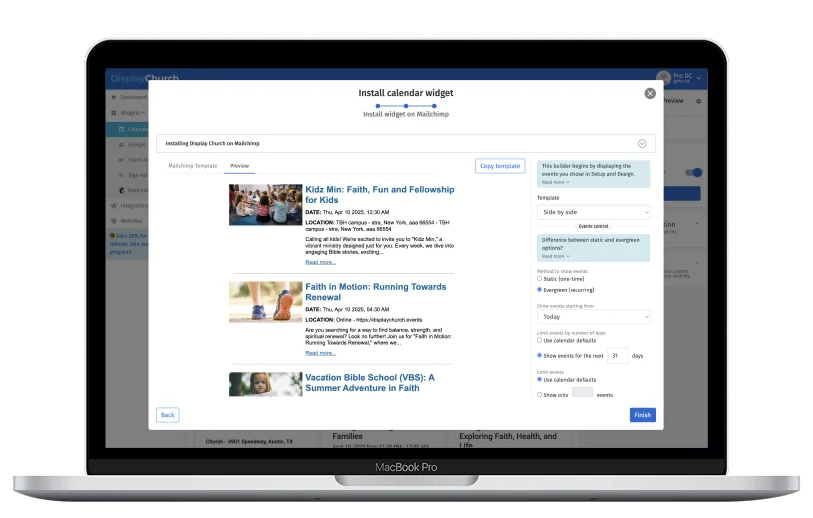
Create a Mailchimp email layout from your Display.Church events. Generate the HTML, copy it into Mailchimp, and spend less time rebuilding the same information.
Email templates are generated for use in Mailchimp. Email sending and campaign management take place in Mailchimp.Less rebuilding. More getting the word out.
One-time or recurring
Choose static event posts or an evergreen format for recurring news.
Refine your event list
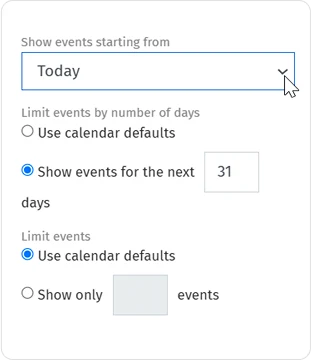
Choose a start day, limit the date range, or set the number of events.
Keep the details intentional
Control which information appears and customize the email alongside your calendar view.
Use the event details you already have.
Generate an email layout from your Display.Church events, then bring the HTML into Mailchimp for your campaign.
- Build the email alongside your connected calendar view.
- Choose a static post for a one-time event selection.
- Use an evergreen format for recurring news.
Send the details that matter this week.
Refine the time window and the amount of information before you generate your email HTML.
- Choose a starting day for the event selection.
- Limit the date range or the number of events.
- Control the visible title, date, location, description, and imagery.
Thoughtful tools.
Less work for your team.
One-time or recurring
Choose static or evergreen event selection to suit the kind of update you are preparing.
A focused time window
Keep the list relevant by setting the starting day, number of days, or event count.
Control the detail
Choose which event information and images to include in the generated layout.
Use your existing campaign tools
Copy the generated HTML into Mailchimp, where you manage recipients, scheduling, and sending.
Connect. Customize.
Share with your church.
Connect your source
Create your Display.Church account and connect a supported integration.
Make it feel like you
Choose your display options, refine the content, and customize the design.
Bring it into Mailchimp
Generate your email HTML and use it in your Mailchimp campaign.
Choose your connection.
Check the supported source and find the setup guidance for your church.
Loved by real churches
The Display.Church Mailchimp template is a massive time saver. I can see the potential in it, so I think it’s a good product. The reason why we even went to Display.Church is the ability to create something once and have it populate to all these different areas.

Does Display.Church send the email?
No. Display.Church generates the email HTML. Sending and campaign management take place in Mailchimp.
What does evergreen mean here?
It is the recurring format for your event selection, compared with a static selection for a one-time post. It does not mean Display.Church schedules or sends Mailchimp campaigns.
Can I limit the events in the email?
Yes. Choose a start day, limit the range by days, or show a set number of events.